Tuesday, February 24, 2015

URLs : U R Loaded with Information

In my early days of forensics, I considered URLs in web histories as nothing more than addresses to websites, and strictly speaking, that’s true. But URLs often contain form information supplied by the user and other artifacts that can be relevant to an investigation, too. Most of us in the business know this already, at least it concerns one commonly sought after ingot: the web search term.

Consider the following URL:

https://www.google.com/webhp?sourceid=chrome-instant&ion=1&espv=2&ie=UTF-8#q=linuxsleuthing

Most examiners would key in on the domain google.com and the end of the url, q=linuxsleuthing, and conclude this was a Google search for the term "linuxsleuthing", and they’d be right. But is there anything else to be gleaned from the URL? Just what do all those strings and punctuation mean, anyway?

What’s in a URL

Let’s use the URL above as our discussion focus. I’ll break down each element, and I’ll mention at least one value of the element to the forensic investigator (you may find others). Finally, I’ll identify and demonstrate a Python library to quickly dissect a URL into its constituent parts.

Protocol

https://www.google.com/webhp?sourceid=chrome-instant&ion=1&espv=2&ie=UTF-8#q=linuxsleuthing

The URL starts with the protocol, the "language" the browser must speak to communicate with the resource. In the Python urllib module that I will introduce later, the protocol is referred to as the "scheme".

Examples:

  • http: - Internet surfing

  • https: - Secure Internet surfing

  • ftp: - File transfer operations

  • file: - Local file operations

  • mailto: - Email operations

The forensics value of a protocol is that it clues you into the nature of the activity occurring at that moment with the web browser.

Domain

https://www.google.com/webhp?sourceid=chrome-instant&ion=1&espv=2&ie=UTF-8#q=linuxsleuthing

The domain can be thought of as the place "where the resource lives." Technically, it can consist of three parts: the top-level domain (TLD), second-level domain, and the host name (or subdomain). If you are more interested in those terms, I’ll leave it to you to research. Suffice it to say that we think of it as the "name" of the website, and with good reason. The names exist in this form because they can be easily memorized and recognized by humans. You may also encounter the domains evil twin in a URL, the Internet Protocol (IP) address, which domain names represent.

The Python urllib module referes to the domain as the "netloc" and identifies it by the leading "//", which is the proper introduction according to RFC 1808.

The forensic value of a domain is that you know where the resource defined in the remainder of the URL can be found or was located in the past.

Port

https://www.google.com/webhp?sourceid=chrome-instant&ion=1&espv=2&ie=UTF-8#q=linuxsleuthing

The port is not listed in this url, nor is it often included in URLs intended for human consumption. However, if you see something like www.google.com:80, the ":80" indicates communication is occurring across port 80. You’ll often see port numbers for URLs to video servers, but port numbers are by no means limited to such uses. The Python urllib module incorporates the port in the "netloc" attribute.

The chief forensic value of a port is that it can clue you into the type of activity occurring on the domain because many port numbers are well known and commonly used for specific tasks.

Path

https://www.google.com/webhp?sourceid=chrome-instant&ion=1&espv=2&ie=UTF-8#q=linuxsleuthing

In terms of a web server, the path indicates the path to the resource on the server. If the "file:" protocol is seen in the URL, then the path signifies the logical location of the file on the local machine. In fact, there will not be a domain, though the domain preamble is present, which is why you see three forward slashes for a file:

file:///path.

The Python urllib module also uses the name "path" to describe this hierarchal path on the server. Please understand that both hard paths and relative paths are possible. In addition, Python describes "params" for the last path element which are introduced by a semicolon. This should not be confused with the parameters I describe in the next section.

The principle forensic value of the path is the same as the over riding principle of real estate: location, location, location.

Parameters

https://www.google.com/webhp?sourceid=chrome-instant&ion=1&espv=2&ie=UTF-8#q=linuxsleuthing

Parameters are information passed to the web server by the browser. They are also referred to as "query strings". Parameters can include environment information, web form data, window size, and anything else the web site is coded to pass on. Parameter strings are indicated by a leading "?" followed by key:value pairs. Multiple parameters are separated by "&". Python calls parameters the "query."

Consider our sample URL. It can be seen to have four parameters:

  • sourceid=chrome-instant

  • ion=1

  • espv=2

  • ie=UTF-8

Parameters are really the meat and potatoes of URL analysis, in my opinion. It is here I find the most interesting details: the user name entered on the previous web page; in the case of mobile devices, the location of the device (lat/lon) when the Facebook post was made; the query on the search engine, etc.

Despite what I said in the preceding paragraph, note that query string is not present the case of our sample URL. The search was conducted through the Google Chrome browser address bar (sourceid=chrome-instant). Thus, it is not safe to assume that all search engine search terms or web form data are to be found in the URL parameters.

To throw a little more mud on the matter, consider that the entry point of the search and the browser make a difference in the URL:

Search for linuxsleuthing from the Ubuntu start page, FireFox
https://www.google.com/search?q=linuxsleuthing&ie=UTF-8&sa=Search&channel=fe&client=browser-ubuntu&hl=en&gws_rd=ssl

Here, we see the same search, but different parameters:

  • q=linuxsleuthing

  • ie=UTF-8

  • sa=Search

  • channel=fe

  • client=browser-ubuntu

  • hl=en

  • gws_rd=ssl

Caution
Parameters will mean different things to different sites. There is no "one-definition fits all" here, even if there be obvious commonality. It will take research and testing to know the particular meaning of any given parameter even though it may appear obvious on its face.

Anchor

https://www.google.com/webhp?sourceid=chrome-instant&ion=1&espv=2&ie=UTF-8#q=linuxsleuthing

The anchor links to some location within the web page document itself. If you’ve ever clicked a link and found yourself halfway down a page, then you understand the purpose of the anchor. Somewhere in the html code of that page is a bookmark of sorts to which that anchor points. Python calls the anchor a "fragment."

In the case of our sample URL, the anchor is the search term I entered in the address bar of the Google Chrome browser.

The forensics value of an anchor is that you know what the user saw or should have seen when at that site. It might demonstrate a user interest or that they had knowledge of a fact, depending on your particular circumstances, of course.

Making Short Work of URL Parsing

Python includes a library for manipulating URLs named, appropriately enough, urllib. The python library identifies the components of a URL a little more precisely than I described above, which was only intended as an introduction. By way of quick demonstration, we’ll let Python address our sample URL

iPython Interative Session, Demonstrating urllib
In [1]: import urllib

In [2]: result = urllib.parse.urlparse('https://www.google.com/webhp?sourceid=chrome-instant&ion=1&espv=2&ie=UTF-8#q=linuxsleuthing')

In [3]: print(result)
ParseResult(scheme='https', netloc='www.google.com', path='/webhp', params='', query='sourceid=chrome-instant&ion=1&espv=2&ie=UTF-8', fragment='q=linuxsleuthing')

In [4]: result.query
Out[4]: 'sourceid=chrome-instant&ion=1&espv=2&ie=UTF-8'

In [5]: result.query.split('&')
Out[5]: ['sourceid=chrome-instant', 'ion=1', 'espv=2', 'ie=UTF-8']

In [6]: result.fragment
Out[6]: 'q=linuxsleuthing'
Note
The Python urllib calls the parameters I discussed a query and the anchor a fragment.

If you have a little Python knowledge, then you can see how readily you could parse a large list of urls. If not, it is not much more difficult to parse a url using BASH.

Parsing URLs using BASH variable substitution

$ url="https://www.google.com/webhp?sourceid=chrome-instant&ion=1&espv=2&ie=UTF-8#q=linuxsleuthing"
$ anchor=${url##*\#}
$ parameters=${url##*\?}
$ parameters=${parameters//#$anchor/}
$ echo ${parameters//&/ }
sourceid=chrome-instant ion=1 espv=2 ie=UTF-8
$ echo $anchor
q=linuxsleuthing

Finding Parameters

If you want to narrow your search for URLs containing parameters and anchors, you need only grep your list for the "&" or "#" characters. If you are processing a history database such as the Google Chrome History SQLite database, you can export the relevant urls with the following query:

SQLite query for Google Chrome History
select * from urls where url like "%?%" or url like "%#%";

What’s All the Fuss?

So, why go to all this length to study a URL? I’ll give two simple illustrations:

In the first case, I had the computer of a person suspected of drug dealing. I found little relevant data on his computer doing basic analysis, including an analysis of search engine search terms. When I examined URL parameters, however, I found searches at website vendors that demonstrated the purchase of materials for growing marijuana.

In the second case, a stolen computer was recovered in close proximity to a suspect who claimed to have no knowledge of the device. The Google Chrome browser in the guest account was used since the date of the theft, so analysis was in order. URL parameters showed a login to the suspect’s Apple account 12 hours after the left. There was no useful data in the cache, only the URL history.

Finally, bear in mind that the URL history is the only artifact you may have of secure website activity. Browsers, by default, do not cache secure elements. Understanding the contents of a URL can clue you into activity for which may find no other artifacts.

It is good to know what’s in a URL!


Monday, February 23, 2015

Finding Felons with the Find Command

Digital devices are common place. Digital device examiners are not. How does the digital dutch boy prevent the digital device dam from breaking? By sticking his preview thumb into the leak.

The point of a forensic preview is to determine if the device you are examining has evidentiary value. If it does, the device goes into your normal work flow. If it does not, it gets set aside. The dam remains intact by relieving it of the pressure of non-evidentiary devices.

The point of this post is not to enter a discussion of the benefits and short comings of forensic previewing. I’m merely going to record a method I recently used to differentiate between the files created by the owner of a laptop computer and those generated by the thief who stole the computer. Hopefully, you see something useful here to adapt to your investigation.

The Plot

Police officers recovered a laptop from a home that they believed was stolen. One roommate said the device had arrived in the home a few days earlier, but did not know how it got there. The remaining members of the household claimed to know nothing about the computer at all.

I booted the device with a Linux boot disc designed for forensic examination. The disc allows storage devices to be examined without making changes. I was lucky enough to find a user account that had been established a few years earlier, and files in that account that allowed me to identify and contact the computer’s owner. The owner reported the device had been stolen from him two weeks earlier. The owner had password protected his account, but there was a guest account available for use.

Catching the Thief

I could have stopped there, but the job would have been only half-done. I knew who owned the computer, but I didn’t know who’d stolen it. Fingerprints were not an option, so I decided to look for data in the computer that might identify who had used the computer since it had been stolen. A quick look in the guest account showed me I was not going to be as lucky identifying the suspect as I had the victim: there were no user created documents.

What I need to do was to find the files modified by the suspect and inspect those files for identifying information. The suspect may not have purposely created files, but browsing the Internet, etc, creates cache and history files that point out a person as surely than a witness in a suspect lineup (that is to say, not with 100 percent certainty, but often reliable none-the-less).

File systems are very helpful in examinations of this nature: they keep dates and times that files are created, accessed and modified, just to name a few date attributes. Modern operating systems are very helpful, too, because they usually auto-sync the computer’s clock with NTP (Network Time Protocol) servers. Simply stated, modern operating systems keep accurate time automatically.

With this knowledge in mind, I was looking for guest account files (and, ultimately, all files) that were modified in in the past two weeks. Files modified outside that range were changed by the owner and of no interest. Fortunately, the find command provides a solution:

GNU Find command, example 1
# This command returns all files modified less than 14 days ago
$ find path/to/search -mtime -14 -daystart
Note
The -daystart option causes find to measure times from the start of the day rather than the last 24 hours.

The -mtime n option takes integer argument n. This is where a little explanation is in order. Had I passed the integer "14", I would have only returned files modified 14 days ago. Passing "-14" returns all files modified less than 14 days ago. Passing "+14" would cause find to return all files modified more that 14 days ago. It is possible to pass two -mtime options to create a narrow range, such as:

GNU Find command, example 2
# This command returns all files modified between 7 and 14 days ago
$ find path/to/search -mtime -14 -mtime +7

The command in the first example resulted in just over 1600 file names being returned. I saw that most of these were Google Chrome browser application data files. Both the "History" and "Login Data" SQLite databases contained data leading to the identity of the computer user since the date the laptop was stolen (a roommate) and the dates of the activity suggested the computer had been in that person’s possession since shortly after the theft.

Telling Time

The date command can really be your friend in figuring out dates and date ranges. It is easier to demonstrate than explain:

GNU Date command, example 1
$ date
Mon Feb 23 12:41:41 PST 2015
$ date -d 'now'
Mon Feb 23 12:41:50 PST 2015
Note
The two commands above do the same thing.
GNU Date command, example 1
$ date -d 'yesterday'
Sun Feb 22 12:43:42 PST 2015
$ date -d 'tomorrow'
Tue Feb 24 12:43:49 PST 2015
Note
The date command understands simple english. Used thusly, it calculates based on 24 hour periods, not from the start of the day.
GNU Date command, example 1
$ date -d '1 day ago'
Sun Feb 22 12:48:57 PST 2015
$ date -d '1 year ago'
Sun Feb 23 12:49:14 PST 2014
$ date -d 'next week'
Mon Mar  2 12:49:53 PST 2015

Note: The info date command will show you many, many more useful invocations of the date command.

Determining Elapsed Days

You may recall that the find command takes an integer for its date range options, but none of the date commands I illustrated above yielded and integer show the number of days elapsed or until that date. If there is an option for date to yield such information, I have not discovered it. However, a simple shell script can be created to allow us to use the "plain language" of the date command to help us determine the integers required by find.

count_days.sh
# This is a simple script that does not test user input for correctness
# usage: count_days.sh date1 date2

# collect dates from command line and covert to epoch
first_date=$(date -d "$1" +%s)
secnd_date=$(date -d "$2" +%s)

# calculate the difference between the dates, in seconds
difference=$((secnd_date - first_date))

# calculate and print the number of days (86400 seconds per day)
echo $((difference / 86400))
Note
This script can be made executable with chmod +x count_days.sh or simply executed by calling it with bash: bash count_days.sh

Now, we can figure out the number of days elapsed using the same plain language conventions accepted by the date command. Be sure to enclose each date in parenthesis if the date string is more than one word.

count_days.sh
# How many days have elapsed since January 10
$ bash count_days.sh "jan 10" "now"
44

# How many days elapsed between two dates
$ bash count_days.sh "nov 27 2013" "Aug 5 2014"
250

# How many days will elapse between yesterday and 3 weeks from now
$ bash count_days.sh "yesterday" "3 weeks"
22

You get the idea. And I hope I’ve given you some ideas on how to use the find and date commands to your advantage in a preview or other forensic examination.


Wednesday, January 7, 2015

Getting Attached: Apple Messaging Attachments

I sometimes get questions about showing attachments in Apple iDevice messaging databases. The questions, however, seem to come at a time when I don’t have any databases on hand to study the issue. Well, this week I stumbled on the chats.db during an exam of a MacBook Air. The database contains iMessage and SMS messages, and can be configured to sync with the user’s other iDevices (iPhone, for example) through iCloud. So, I took a look at the database an determined a way to match the attachments with the messages.

The chats.db is found in the users directory in the Library/Messages folder.

Location of chats.db
Library/Messages/
Library/Messages/Attachments
Library/Messages/chat.db
Library/Messages/chat.db-shm
Library/Messages/chat.db-wal

As you can see, message attachments are located in the Attachments sub-folder. But how are they referenced in the chats.db, and how are they matched to the correct message? The database schema gives us the clues we need.

The chats.db table schema
CREATE TABLE _SqliteDatabaseProperties
    (key TEXT,
    value TEXT,
    UNIQUE(key));

CREATE TABLE chat
    (ROWID INTEGER PRIMARY KEY AUTOINCREMENT,
    guid TEXT UNIQUE NOT NULL,
    style INTEGER,
    state INTEGER,
    account_id TEXT,
    properties BLOB,
    chat_identifier TEXT,
    service_name TEXT,
    room_name TEXT,
    account_login TEXT,
    is_archived INTEGER DEFAULT 0,
    last_addressed_handle TEXT,
    display_name TEXT,
    group_id TEXT);

CREATE TABLE attachment
    (ROWID INTEGER PRIMARY KEY AUTOINCREMENT,
    guid TEXT UNIQUE NOT NULL,
    created_date INTEGER DEFAULT 0,
    start_date INTEGER DEFAULT 0,
    filename TEXT,
    uti TEXT,
    mime_type TEXT,
    transfer_state INTEGER DEFAULT 0,
    is_outgoing INTEGER DEFAULT 0,
    user_info BLOB,
    transfer_name TEXT,
    total_bytes INTEGER DEFAULT 0);

CREATE TABLE handle
    ( ROWID INTEGER PRIMARY KEY AUTOINCREMENT UNIQUE,
    id TEXT NOT NULL,
    country TEXT,
    service TEXT NOT NULL,
    uncanonicalized_id TEXT,
    UNIQUE (id,
    service) );

CREATE TABLE chat_handle_join
    ( chat_id INTEGER REFERENCES chat (ROWID) ON DELETE CASCADE,
    handle_id INTEGER REFERENCES handle (ROWID) ON DELETE CASCADE,
    UNIQUE(chat_id,
    handle_id));

CREATE TABLE message
    (ROWID INTEGER PRIMARY KEY AUTOINCREMENT,
    guid TEXT UNIQUE NOT NULL,
    text TEXT,
    replace INTEGER DEFAULT 0,
    service_center TEXT,
    handle_id INTEGER DEFAULT 0,
    subject TEXT,
    country TEXT,
    attributedBody BLOB,
    version INTEGER DEFAULT 0,
    type INTEGER DEFAULT 0,
    service TEXT,
    account TEXT,
    account_guid TEXT,
    error INTEGER DEFAULT 0,
    date INTEGER,
    date_read INTEGER,
    date_delivered INTEGER,
    is_delivered INTEGER DEFAULT 0,
    is_finished INTEGER DEFAULT 0,
    is_emote INTEGER DEFAULT 0,
    is_from_me INTEGER DEFAULT 0,
    is_empty INTEGER DEFAULT 0,
    is_delayed INTEGER DEFAULT 0,
    is_auto_reply INTEGER DEFAULT 0,
    is_prepared INTEGER DEFAULT 0,
    is_read INTEGER DEFAULT 0,
    is_system_message INTEGER DEFAULT 0,
    is_sent INTEGER DEFAULT 0,
    has_dd_results INTEGER DEFAULT 0,
    is_service_message INTEGER DEFAULT 0,
    is_forward INTEGER DEFAULT 0,
    was_downgraded INTEGER DEFAULT 0,
    is_archive INTEGER DEFAULT 0,
    cache_has_attachments INTEGER DEFAULT 0,
    cache_roomnames TEXT,
    was_data_detected INTEGER DEFAULT 0,
    was_deduplicated INTEGER DEFAULT 0,
    is_audio_message INTEGER DEFAULT 0,
    is_played INTEGER DEFAULT 0,
    date_played INTEGER,
    item_type INTEGER DEFAULT 0,
    other_handle INTEGER DEFAULT -1,
    group_title TEXT,
    group_action_type INTEGER DEFAULT 0,
    share_status INTEGER,
    share_direction INTEGER,
    is_expirable INTEGER DEFAULT 0,
    expire_state INTEGER DEFAULT 0,
    message_action_type INTEGER DEFAULT 0,
    message_source INTEGER DEFAULT 0);

CREATE TABLE chat_message_join
    ( chat_id INTEGER REFERENCES chat (ROWID) ON DELETE CASCADE,
    message_id INTEGER REFERENCES message (ROWID) ON DELETE CASCADE,
    PRIMARY KEY (chat_id,
    message_id));

CREATE TABLE message_attachment_join
    ( message_id INTEGER REFERENCES message (ROWID) ON DELETE CASCADE,
    attachment_id INTEGER REFERENCES attachment (ROWID) ON DELETE CASCADE,
    UNIQUE(message_id,
    attachment_id));

I’ll provide a summary of the database as I understand it. Messages are predictably stored in the message table. The message table lacks a reference to attachments, other than the fact that one exists: + cache_has_attachments INTEGER DEFAULT 0+. The default setting is zero, meaning no attachements are stored. A value of 1 indicates there is an attachment in the Attachments sub-folder. One other issue we find when examining the message table is that there is a reference to the remote party in the conversation (handle_id INTEGER DEFAULT 0), but not the extact address—email, account identifier, or phone number—that an investigator would desire. That information is stored in the handle table. It is up to us to figure out how to relate the tables together.

Can’t we all just get along?

The difficulty in examining SQLite databases is determining how they are intended to relate information. There is seldom anything in the database itself that explains its intended use. It can similar to stumbling upon raw building materials and trying to figure out what is being built. Sometimes it’s easy, other times, not so much. But with the chats.db database, three table schema entries give us a clue as to the database design.

SQLite table join hints
CREATE TABLE chat_handle_join
    ( chat_id INTEGER REFERENCES chat (ROWID) ON DELETE CASCADE,
    handle_id INTEGER REFERENCES handle (ROWID) ON DELETE CASCADE,
    UNIQUE(chat_id,
    handle_id));

CREATE TABLE chat_message_join
    ( chat_id INTEGER REFERENCES chat (ROWID) ON DELETE CASCADE,
    message_id INTEGER REFERENCES message (ROWID) ON DELETE CASCADE,
    PRIMARY KEY (chat_id,
    message_id));

CREATE TABLE message_attachment_join
    ( message_id INTEGER REFERENCES message (ROWID) ON DELETE CASCADE,
    attachment_id INTEGER REFERENCES attachment (ROWID) ON DELETE CASCADE,
    UNIQUE(message_id,
    attachment_id));

INFO: The message_attachment_join table shows us that the message_id column in the table refers to the message table rowid column. Likewise, the attachment_id refers to the attachment table rowid. Thus, the message_attachment_join table is used to match attachments to messages.

Each of the table names above ends in the word join. As used, the word join is just part of a table name, but it hints at a SQLite table operation called a JOIN. A join combines two tables into one, and in SQLite there are two basic joins: INNER and OUTER. Inner joins, which come three variations, result in a combined table that includes only rows matching the join criteria. That is, the combined table only includes records with rows from each table that have one or more matching column values. While these are the default type of JOIN in SQLite, we are interested in results that show all messages, not just those with attachments.

OUTER joins, by contrast, do not require the records from each table to have a matching column. This means we can have combined table that shows all message rows, and if properly joined to the attachment table, rows containing messages with attachments will show attachment details. Further, if we join the handle table to the message table, we have everything we might want for an investigation.

I will be using a LEFT OUTER JOIN, which is shortened in syntax to LEFT JOIN. The basic syntax is "SELECT column(s) FROM left_table LEFT JOIN right_table ON left_table.columnName = right_table.columnName". A LEFT JOIN returns all rows of the left_table regardless of matching rows in the right table. Where rows match in the right table, they are joined to the matching left table row.

Tip
It is easier to understand and troubleshoot SQL queries by reading them backwards: Predicate, then subject. For example, reading the query in the paragraph above as "FROM left_table LEFT JOIN right_table ON left_table.columnName = right_table.columnName SELECT column(s)" can lend clarity to the output.

Applying a LEFT JOIN to the chats table, we can create a "Super table" combining the message, attachment, and handle tables.

SELECT *
FROM message AS m
LEFT JOIN message_attachment_join AS maj ON message_id = m.rowid
LEFT JOIN attachment AS a ON a.rowid = maj.attachment_id
LEFT JOIN handle AS h ON h.rowid = m.handle_id
Tip
The "expr1 AS expr2" statement sets expr2 as an alias for expr1, saving keystrokes and making the lines easier to read. Thus message_attachement_join.attachment_id becomes maj.attachment_id.

Entirely accurate, but probably containing more information than we need, the above query results in the following columns:

Table 1. Columns

ROWID

guid

text

replace

service_center

handle_id

subject

country

attributedBody

version

type

service

account

account_guid

error

date

date_read

date_delivered

is_delivered

is_finished

is_emote

is_from_me

is_empty

is_delayed

is_auto_reply

is_prepared

is_read

is_system_message

is_sent

has_dd_results

is_service_message

is_forward

was_downgraded

is_archive

cache_has_attachments

cache_roomnames

was_data_detected

was_deduplicated

is_audio_message

is_played

date_played

item_type

other_handle

group_title

group_action_type

share_status

share_direction

is_expirable

expire_state

message_action_type

message_source

message_id

attachment_id

ROWID

guid

created_date

start_date

filename

uti

mime_type

transfer_state

is_outgoing

user_info

transfer_name

total_bytes

ROWID

id

country

service

uncanonicalized_id

Note
If you look carefully at the schema at the top of this article, and the column listing above, you will notice that the columns are those of all four tables combined and in the order they are referenced.

We can refine the output by identifying specific columns we wish to display from each row. We can use the DATETIME function to convert the Mac Absolute Time in the date column to local time (by first converting to Unix epoch by adding a few more than 978 million seconds) and interpret the is_from_me column from integer to text using a CASE statement.

SELECT
    m.rowid,
    DATETIME(date +978307200, 'unixepoch', 'localtime') AS date,
    id AS address,
    m.service,
    CASE is_from_me
        WHEN 0 THEN "Received"
        WHEN 1 THEN "Sent"
        ELSE is_from_me
    END AS type,
    text,
    CASE cache_has_attachments
        WHEN 0 THEN Null
        WHEN 1 THEN filename
    END AS attachment
FROM message AS m
LEFT JOIN message_attachment_join AS maj ON message_id = m.rowid
LEFT JOIN attachment AS a ON a.rowid = maj.attachment_id
LEFT JOIN handle AS h ON h.rowid = m.handle_id

With this query, we end up with an easy to read output containing interpreted values with the following columns:

Table 2. Columns

ROWID

date

address

service

type

text

attachment

Tip
Why include message table ROWID? Row id’s a generated automatically for each message added to the database. A break in sequence will show a record has been deleted. Since it is possible to recover deleted records from SQLite databases, it is a convenient way to alert the investigator more analysis is required. Further, in the case of attachments multiple attachments, there will be one row for each attachment in a message. A repeating ROWID indicates two or more attachments are present for the message.

I hope this discussion of SQLite JOIN operations as they relate to the Apple iOS chats.db will help you in your examination of SQLite databases.


Thursday, July 10, 2014

Identifying Android Device Owners

I work in a college town.  That means lots of unsecured electronics.  Lots of unsecured electronics means lots of thefts and 'misplaced'--"I'm not as think as you drunk I am!"--devices.

I've seen a trend in recovered stolen devices over the past few years: the bad guys are rapidly restoring devices to factory settings to prevent them from being tracked by the owner or law enforcement.  That leaves me with a problem, though: how do I determine the owner of a device that has been restored?   Allocated data that could show ownership is deleted upon a system restore.  Since, I've discussed other devices in the past, today I'll focus on Androids.

Dispossessed Androids

I've had uneven success with Androids in the past.  This may be due in part to the fact that I've not always know what to look for.  But I received two more such devices this week and decided to apply myself, once again, to the problem of identifying the owners.  Since I became an Android owner myself over the past 18 mos, I had a device with known data with which to experiment.

Android Recovery

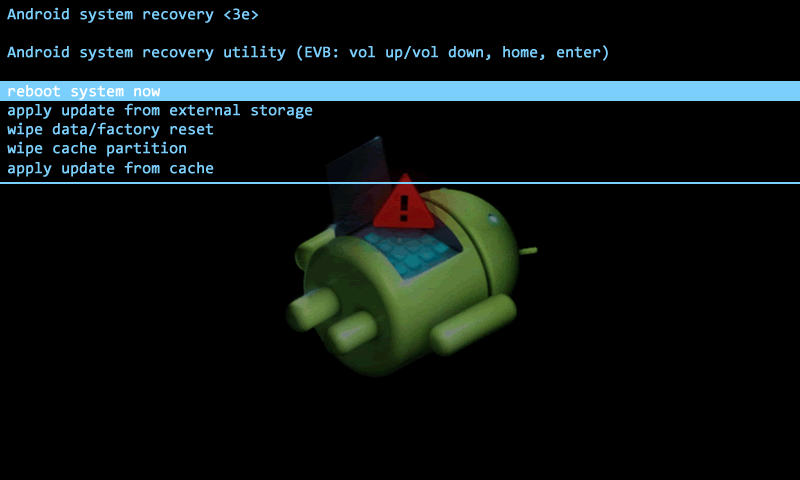
Nearly all data that contains identifying information is stored in the 'data' partition.  When a device is restored or 'wiped' through the Android recovery system, personal data is removed.  This process is usually quite fast, which leads me to believe that 'wiping' user data is a simple delete in most cases.   There are custom recoveries where this might not be true, but a study of unallocated data in a wiped device reveals a rich data field. 

In Unix-like systems, physical storage devices are attached to the operating system through special files (drivers) called device nodes.  These nodes provide raw access to devices and their partitions.  Thus, if a device node, also referred to as a block device, is addressed, all content is accessible, allocated and unallocated alike.  Block devices can be thought of and addressed by software tools as files.  To access block devices, however, one must have root access to the operating system.  I will not be discussing the various ways to achieve root access to an Android device in this article, however.  I will continue on the assumption that the device has been rooted.

Tinkering under the hood

Access to a running Android device is done through the Android Debug Bridge (adb).  In a stock recovery or Android operating system, adb provides shell user access to the file system.  The shell user has limited access to the device and commands, but the root user has full access.  Root access, when not immediately granted through the adb shell command, is obtained by the su command.
shell@device:/ $
shell@device:/ $ su
root@device:/ # 
Block device files are found in the /dev/block directory. The file representing the entire NAND flash is the /dev/block/mmcblk0 file. Partitions are represented as /dev/block/mmcblk0p1, /dev/block/mmcblk0p2, etc. A paritial directory listing in my device, for example, is:
/dev/block/mmcblk0
/dev/block/mmcblk0p1
/dev/block/mmcblk0p10
/dev/block/mmcblk0p11
/dev/block/mmcblk0p12
/dev/block/mmcblk0p13
/dev/block/mmcblk0p14
/dev/block/mmcblk0p15
/dev/block/mmcblk0p16
/dev/block/mmcblk0p17
/dev/block/mmcblk0p18
/dev/block/mmcblk0p19
We could address the entire memory storage device through mmcblk0, but it would be more efficient to address just the data partition.  But which of these is the data partition?  There are several ways to figure this out, and while not all of the following methods will work on every device, at least one should.
  1. If the data partition is mounted, such as would occur in a rooted and running operating system, simply issue the mount command:

    # mount | grep /data
    /dev/block/mmcblk0p25 on /data type ext4 (ro,relatime,barrier=1,data=ordered)

  2. Check the contents of the /etc/fstab file:

    # cat /etc/fstab
    /dev/block/mmcblk0p24 /system ext4 rw
    /dev/block/mmcblk0p25 /data ext4 rw
    /dev/block/mmcblk0p26 /cache ext4 rw
    /dev/block/mmcblk1p1 /sdcard vfat rw
    /dev/block/mmcblk0p28 /emmc vfat rw
    /dev/block/mmcblk1p2 /sd-ext  rw
    /dev/block/mmcblk0p21 /efs ext4 rw

  3. Look for the 'by-name' directory somewhere in the /dev/block/platform subtree:

    # ls /dev/block/platform/msm_sdcc.1/by-name/ -l | grep data  
    lrwxrwxrwx root root 2014-06-24 03:10 data -> /dev/block/mmcblk0p25

    Note that the 'by-name' data file is actually link to the /dev/block/mmcblk0p25.

Getting to the Point

Ok, we know how to identify and address the data partition, but for what do we search?  After some experimentation with my own device, it appears that a very profitable target are application license files. The com.application.vending domain contains application licensing information.  On my device, I found 16 binary files in the /data/data/com.android.vending/cache/main/ directory that appear to be application licenses from applications downloaded from the Google Play store.  While I could not find specific information about these files, a reading of Android developer page for licensing applications suggests this files purpose.  Importantly all contained my username in the form of:
account="androiduser@gmail.com"
Crafting a search of the data partition of a restored device with this knowledge is fairly simple:
# strings mmcblk0p25 | egrep -o 'account="?.{1,25}@gmail.com"?'
Note: the strings and egrep commands are available through busybox which can be temporarily installed to the /dev/ folder (a temporary file system in RAM) if not already present in your environment using the adb push busybox /dev/ command.
Output of the search can be sorted and counted using a sort | uniq pipeline for clean results.
# strings -td mmcblk0.raw | \egrep -o 'account="?.{1,25}@gmail.com"?' | \sort | uniq -c | sort -n
1 account=user1@gmail.com
13 account=user2@gmail.com
970 account="user2@gmail.com"
2161 account="user1@gmail.com"
From the output, we can see there have been two user accounts.  Did they both exist on the system at the same time.  Has the device changed hands?  We don't know, but we have two email addresses for contacting people who might know!


Tuesday, May 6, 2014

Searching for Searches

In a recent examination of smart phone content, it became necessary to know the personal interests of the device's owner.  You can browse internet and app history, but that can be extensive to review every URLs to every clicked link and served page.  To get directly to the point, I decided to search for his browser/app search query history.  I was hoping to craft a regular expression (or several) that would assist in giving me a good idea of the person's interests.

I studied some top search engine results and reviewed some browser history and crafted the following GNU extended regular expression:

[?&](k|p|q|query)=[a-zA-Z0-9+_%-]+

This search, run against strings output of files, found search queries for Google, Yahoo!, Bing, Ask, Aol, Faceboot, YouTube, Vimeo and some x-rated sites as well as app content such as Twitter.  Search results appear (depending on what you feed and how you configure GNU grep) similar to:

https://www.google.com/search?q=you+found+me
http://m.youtube.com/results?q=some%20video%20i%20like
https://m.facebook.com/search/?query=that%20guy%20

An added benefit to this expression is that it also hits on additional page results, Google images page refreshes, etc.   With little command line wiz-bangery, it's even possible to sort and count the results to get a histogram of searches:

strings History.plist | egrep -o '[?&](k|p|q|query)=[a-zA-Z0-9+_%-]+' | sed 's/.*=//' | sort | uniq -c | sort -nr

I'll explain the command above:
  1. strings History.plist # extract ascii strings from the iPhone Safari History.plist
  2. egrep -o '[?&](k|p|q|query)=[a-zA-Z0-9+_%-]+' # grep for the regular expression described above
  3. sed 's/.*=//' # strip off the query tag at the front of the user typed query
  4. sort # sort the results alphabetically
  5. uniq -c  # count the matching lines
  6. sort -nr # reverse sort, placing the most frequent query terms first.
Results of the command look similar to the following:

   21    I+search+for+this+a+lot
   11    this%20one%20a%20little%less
    2    why+would+anyone+read+linux+sleuthing
    1    testing%20one%20two

The expression could be run against all logical files in a device and against unallocated space, if applicable.  I only demonstrate it using the History.plist because it's easy illustrate.

I post this short article both because I want to remember this regular expression (the whole reason for my blog in the first place) and to solicit favorite search box/engine regular expressions you might have. Please share them in a comment if you get a chance.  Happy searching!

Tuesday, April 22, 2014

Finding Serial Numbers on Locked iPhones

Apple iDevices have their serial number engraved on the back, right? So why the article? Because it's not true of newer devices like the iPhone 5, 5s, and 5c. Also, original cases can be replaced and serial numbers obliterated through unprotected use or deliberate act. Now I have your attention again, I hope.

Getting the Message

I've written in the past about the libimobiledevice library and it's utilities.  One, which is quite handy for gathering device information is ideviceinfo.  It provides information such as the device description (color), device class (iPhone, iPod, iPad), device name, etc.  When the device is unlocked, you can retrieve the serial number, as well.  Basically, you retrieve the contents of the Info.plist.

But ideviceinfo is not so informative with a locked device.  In fact, it won't show you any output unless you use the -s simple option.  While you can obtain some information, such as the description, class, name, UDID (unique identifier), and Mac address, you can't display the serial number.  But never fear, there is a way...

Linux has a system log that tracks systems events, included the plugging and unplugging of devices. The system log can be dumped the the terminal with the dmesg command.  Run by itself, you dump the entire log and it's quite a lot of information to sift through, though in truth what you want will be found at or near the end of the log.  You can shorten the output to the content you need with

$ dmesg syslog

But an even niftier trick is to set up your system to display the log as it is created and watch the output:

$ tail -f /var/log/syslog

This will display the last 10 lines of the system log and the "follow" it until you cancel with ctrl-c. Now you can hotplug your iDevice and watch the data that the system log records about the device. Unfortunately, you will see that it displays the device UDID and not the serial number in the "SerialNumber" field for a locked iDevice.

Recovering the Serial Number

The serial number is recoverable in Recovery Mode, however.  Pressing and holding the hardware power button brings up the software power off slide button.  Power off the device, and then replug it into your Linux box while holding the hardware home button.  The device will boot into recovery mode.  Now check your syslog with either of the two methods discussed above.  Two serial numbers are displayed in the syslog after the product (iPhone, etc) and manufacturer (Apple) are listed.  The first is the UDID, but the second includes several key:value pairs, one of which is the device serial number (key SRNM).  

When you are done collecting the device data revealed in the syslog, reboot it, if required, by pressing and holding the power button approximately 10 seconds until the recovery screen goes blank.  The device will then reboot into the operating system, probably feeling very ashamed of itself for revealing its secrets so readily.

Time Perspective

Telling time in forensic computing can be complicated. User interfaces hide the complexity, usually displaying time stamps in a human reada...